Meet the New Useberry Surveys: Now With More Ways to Ask

•
5 min read

Useberry Surveys just got more flexible with enhanced question types, new Matrix questions, Multi-Question Pages, and a redesigned survey interface.
Surveys in Useberry just got a lot more flexible.
We’ve expanded our Survey capabilities with more control over existing question types, new Matrix questions, Multi-Question Pages, and a redesigned interface across study creation, participation, and results.
The goal is simple: give researchers more freedom to build the survey their study needs, without making survey creation feel heavier.
Whether you’re collecting product feedback, measuring perceptions, comparing options, or running broader customer and market research, there are now more ways to ask.
Ask it your way
Not every research question needs to be asked in the same way.
We’ve added more flexibility to the question types you already use, so you can be more precise about what you ask and how participants respond.
Open Text
Open Text questions now support validation for:
Number
Date
Email
You can also add a description field to give participants more context.
Single Select
Add a description to provide supporting information before participants choose an answer.
Multiple Select
You can now control how many options participants can select.
Set:
An exact number, such as select up to 3
A range, such as select between 2 and 4
You can also add a description field.
Rating Scale
Rating questions now give you more ways to present the scale.
Choose between:
Numbers
Stars
Emotions
You can also define a label for the middle point of the scale, such as Neutral, and add supporting description text.
Yes / No
Yes / No questions now support description text too.
Small controls, but much more room to shape the survey around your research.
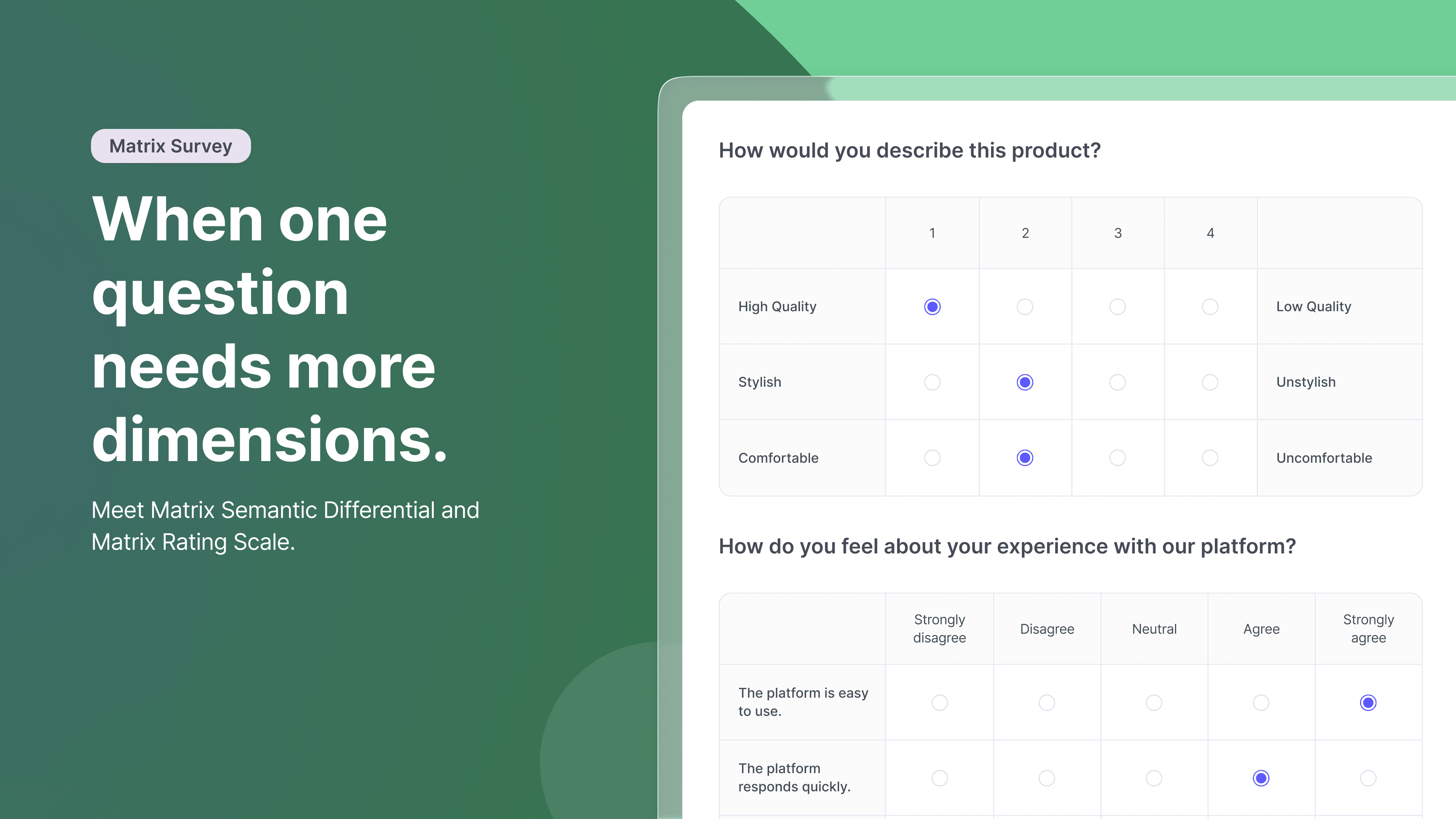
When one question needs more dimensions
Sometimes a simple list of answers is not enough.
That’s where the new Matrix questions come in.
Useberry Surveys now supports:
Matrix Semantic Differential
Measure how participants perceive something across opposing attributes.
For example:
Easy ○ ○ ○ ○ ○ Difficult
Modern ○ ○ ○ ○ ○ Outdated
Clear ○ ○ ○ ○ ○ Confusing
This makes it easier to capture attitudes, perceptions, and reactions across several dimensions at once.
Matrix Rating Scale
Let participants evaluate multiple items against the same set of response options.
Matrix Rating Scale supports both:
Single select
Multiple select
This can be useful for comparing features, experiences, preferences, behaviors, or anything else that needs a more structured set of responses.
Ask more on one page
Surveys no longer need to move one question at a time.
With Multi-Question Pages, you can add multiple questions to the same page and decide how much of the survey participants see at once.
Mix Open Text with Rating Scales. Put a Matrix under a follow-up question. Combine Single Select, Multiple Select, Yes / No, and other formats in whatever structure makes sense for the study.
Every question type available in Useberry Surveys is supported in Multi-Question Pages.
Participants can also review and revise their answers on the page before moving forward.
That gives researchers more freedom to structure studies, while giving participants more context as they respond.

So, what do you want to ask?
Useberry Surveys now supports:
Open Text
Single Select
Multiple Select
Rating Scale
Yes / No
Matrix Semantic Differential
Matrix Rating Scale
And all of them can be used inside Multi-Question Pages.
Together, these updates make it easier to run research such as:
Product and concept feedback
Attitude and perception studies
Customer and market research
UX research surveys
Feature prioritization
Preference studies
Post-test surveys
Follow-up research
A cleaner way to ask, answer, and analyze
We’ve also refreshed the Survey interface across the full workflow.
That includes:
Building and editing questions
The participant-facing survey
Results
The new design supports these more advanced survey capabilities while keeping the experience clear and familiar.
More ways to ask. More ways to learn.
Sometimes you need an open-ended answer.
Sometimes you need a rating.
Sometimes you need a matrix.
And sometimes you need several questions on the same page.
Useberry Surveys now gives you more ways to build the study around the question you’re trying to answer.

Got questions? We’ve got options.
Shape surveys with richer questions and smarter layouts.

